




Game tracking
Games A game tracker that finally makes the backlog visible
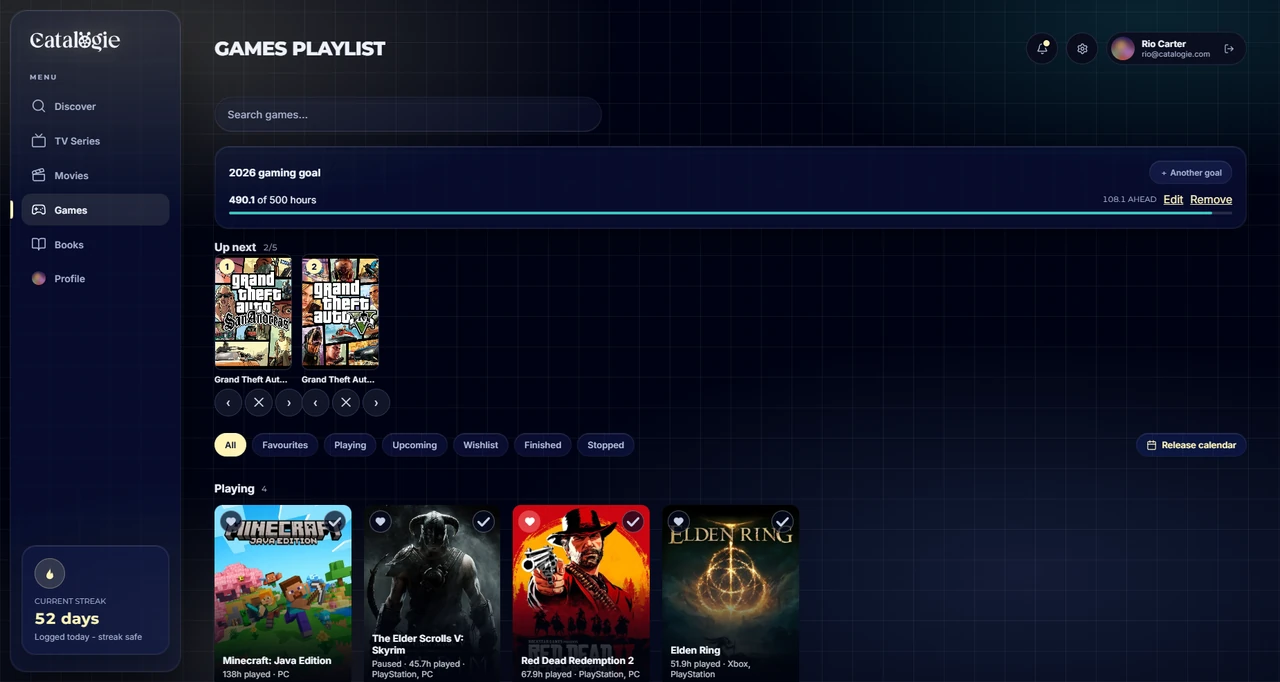
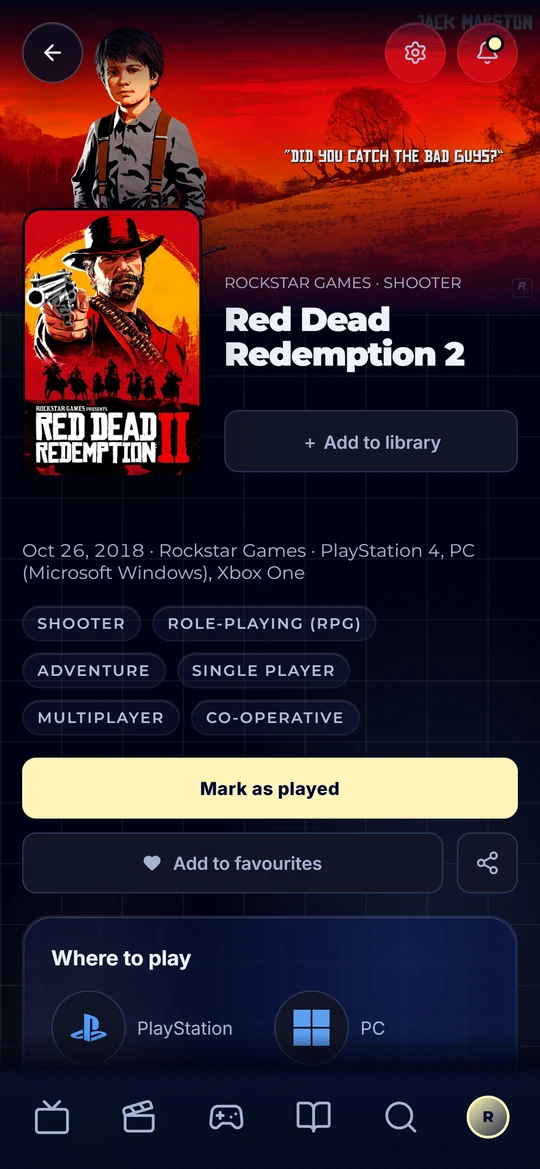
Catalogie tracks what you are playing, what you have finished and the pile you keep telling yourself you will get to. Log hours the way you actually know them - the two you played tonight, or the total Steam is showing you - keep every playthrough, and see the backlog as a real, finite list instead of a feeling.
Free to use, forever · Works on phone and desktop · Bring your history with you

Tame the pile
The modern backlog is not a list, it is a low-grade anxiety spread across Steam, a console library, a subscription service and three storefronts that each think they own your collection. Nobody knows how big it is. That is precisely why it never gets smaller.
Catalogie makes it a list. Playing, beaten, abandoned, and the ones still waiting - across every platform, in one place, with hours attached. A backlog you can actually see is a backlog you can make decisions about, and "what should I play next" stops being a twenty-minute browse that ends in playing nothing.
Hours are logged the way you really know them. Sometimes you know you played two and a half hours tonight. Sometimes you just know Steam says 114. Catalogie takes either - add an increment, or set the total and it works out the difference - and stamps the session with the day you actually played, not the day you got round to recording it.
What you can track
Playing, paused, stopped, finished
One status picker with the states games really have, plus a wishlist. Stopping one asks why, and finishing asks how far you took it - the main story, with the extras, or all the way to 100%.
Hours, two ways
Log an increment ("played 2.5 tonight") or an absolute total ("Steam says 114") and Catalogie works out the difference. Only know roughly? Spread it over a period instead of a single day.
A history you can fix
Every session is a dated row you can edit or delete, with an optional note - so a typo'd "40 hours" is not permanent. A private journal sits underneath for everything else.
Every playthrough, kept
Play it again and the last run stays on record with its own dates, completion, platform, rating and note. Log an earlier playthrough by hand, too.
Platforms and how you own it
PC, console and handheld side by side, with where you play and whether you own it physically, digitally or through a subscription. Your collection stops being four separate collections.
Time to beat
How long the main story, main plus extras, and 100% take, shown on the game page - so "do I have time for this" has an answer before you start rather than forty hours in.
Up next and a yearly goal
Line up the next five games in order, and set a target for the year in games or hours - the Games tab shows whether you are ahead or behind for the date.
Your rating, and everyone else's
Score on five stars with halves or a ten-point scale, set separately for games, next to the critic and player scores and what the Catalogie community made of it.
DLC, series and everything else
Full detail from IGDB - developer, publisher, modes, platforms, screenshots and trailers, plus DLC and expansions, the series it belongs to and a row of similar games.
How it works
- Stage 01
Add the game
Search over 90,000 titles across platforms, with artwork and detail from IGDB. Add it to your library in one tap.
- Stage 02
Log your hours
Add tonight's session, or paste in the total your platform shows. Set the day it happened if it was not today.
- Stage 03
Watch the backlog shrink
Finished games move out of the queue and into your stats - broken down by platform, genre and how far you took them. For once, the pile has a number, and the number goes down.
Start with the collection you already have
An empty library is why tracker switches fail. Bring across what you have already played, so day one is a real picture rather than a blank page.
- Import your Backloggd export - the .json keeps a rating on every game, the .csv works too
- Status and ratings come across with each title, not just the names
- You tell us which app the file came from, so nothing is guessed from a file name
- See every row before anything is saved - what will be added, what matched the wrong title and what could not be placed - and overrule any of it
- Large imports keep running after you close the tab, and we email you when they finish
Game tracking questions
- Is the game tracker free?
- Yes - Catalogie is free to use, forever. Every feature is unlocked for everyone, with no credit card, no trial clock and no expiry. Nothing about backlog or playtime tracking sits behind a paid tier.
- How do I log hours played?
- Two ways, whichever you actually know. Add an increment - "I played 2.5 hours tonight" - or enter an absolute total, such as the 114 hours Steam is showing you, and Catalogie works out the difference. You can also set the day it happened, or spread it over a period, and fix or delete any session afterwards.
- Does it connect to Steam automatically?
- Not yet - hours are entered by you rather than synced. Because you can enter an absolute total, keeping a game current takes one number from your platform's own counter rather than any recalculation on your part.
- Can I track games across different platforms?
- Yes. PC, console and handheld titles sit in one library with the platform recorded per game, so your collection is a single list rather than four separate ones you have to hold in your head.
- What about games I gave up on, or play again?
- Both are covered. Stopped is its own status, with a place to say why, so abandoned games are recorded honestly and stop cluttering the queue. Play a game again and the earlier playthrough stays on record with its own dates, completion and rating.
- Can I see how long a game takes before I start it?
- Yes. The game page shows how long the main story, main plus extras, and 100% take, so you can judge whether it fits the time you have before you commit rather than forty hours in.
- Can I import my games from Backloggd?
- Yes. Import your Backloggd export - the .json if you can, since it keeps a rating on every game, though the .csv works too. Before anything is saved you see every row it will add, every game it matched and anything it could not place, and you can overrule any of it.
- Is my game library private?
- Private by default. Games have their own sharing toggle, separate from movies, TV and books, so you can share a backlog without sharing anything else, or share nothing at all.
- Does it track anything besides games?
- Yes. Movies, TV series and books share the same library and dashboard, so the whole of your media life is one place rather than an app per medium.

See your backlog properly
Free to use, forever. Add what you are playing and find out how big the pile really is.
Create your free account