





TV series tracking
TV Series A TV show tracker that knows exactly where you stopped

Catalogie tracks TV episode by episode, not show by show. It remembers the exact episode you stopped on, tells the difference between a series that ended and one that is only between seasons, and shows you what is waiting to be watched - so you never open a show and spend ten minutes working out where you were.
Free to use, forever · Works on phone and desktop · Bring your history with you

Never lose your place mid-season
Tracking TV is harder than tracking films, and most trackers pretend otherwise. A film is one thing you either saw or did not. A series is eighty things, watched out of order, across three years, on four services, with a gap in the middle where you drifted off in season two and came back the following autumn.
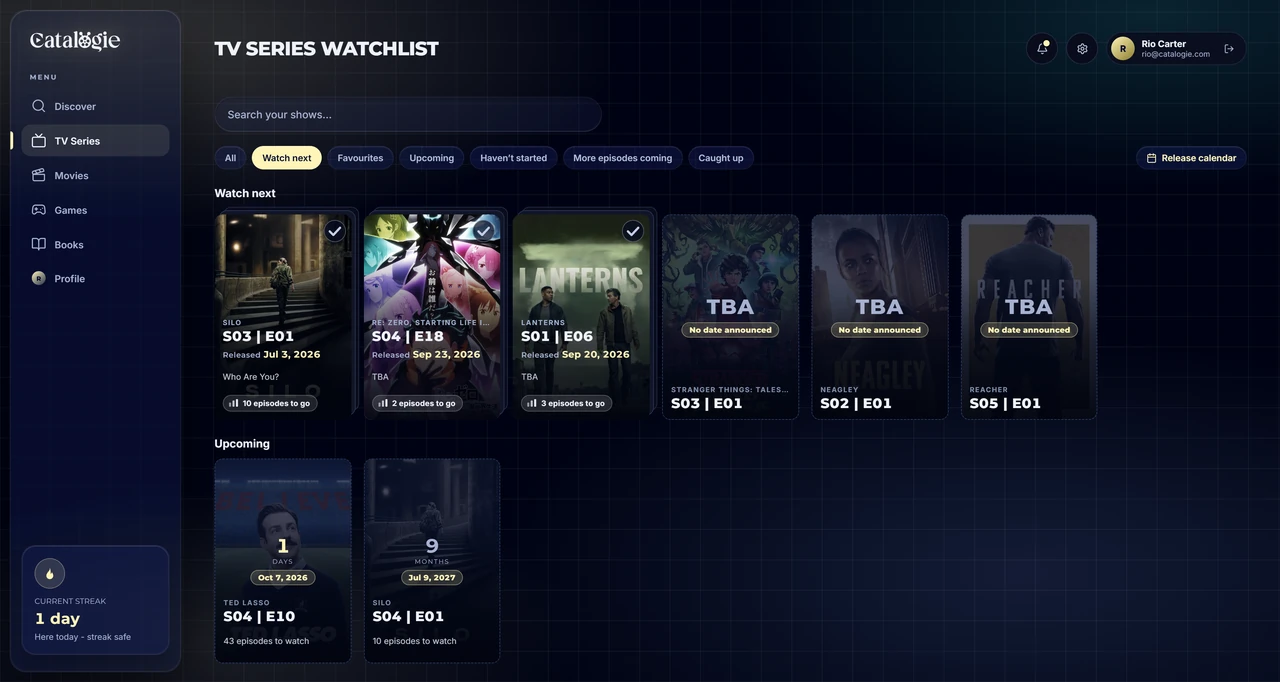
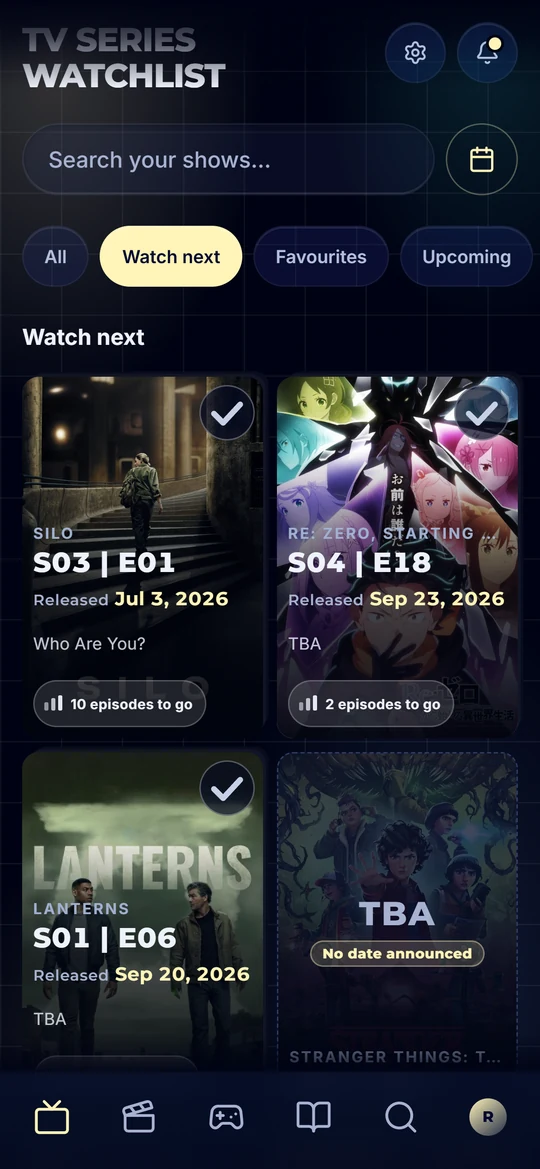
Catalogie tracks the episodes, not the show. Mark them as you go and your position is a real one - season four, episode seven - rather than a vague sense that you were somewhere near the end. Finished a whole season in a weekend? Mark the season in one action instead of tapping through ten episodes.
It also keeps a distinction almost nothing else bothers with: a show that has ended and a show that is merely between seasons are not the same thing. One is finished. The other is waiting. Catalogie files them separately, so your finished list stays honest and the shows with more to come keep nudging you.
What you can track
Episode-level progress
Your position is an actual episode, not a guess. Come back after six months and the show tells you where you were instead of asking you to remember.
Catch up in one go
Tick an episode mid-season and Catalogie offers to mark everything before it - spread across the days you actually watched them, rather than piled onto today.
Watch next, in one place
Every show with an episode waiting, then every show with one on the way, each with a countdown. A stack shows how many episodes are left, and pressing it deals them out so you can see what and when.
Rate individual episodes
Not just the series - each episode takes its own score, shown on the episode still alongside that episode's IMDb rating. The one great hour in a mediocre season gets its due.
Ended, or just between seasons
A show that is still airing is not filed away as finished. With no date announced it sits under "More episodes coming", marked TBA - naming the episode that is coming, not the last one that aired - so your finished list means something.
Know when the next season lands
Upcoming episodes and returning seasons appear in a calendar next to your films and games, so a return date does not pass without you noticing.
Rewatches, kept separately
Starting a favourite again does not wipe the first time through. Rewatches are counted on their own, so the record of when you first saw it survives.
Cast, seasons and what to watch next
Open a series for its full season and episode list, cast, genres and a row of similar shows - enough to pick the next one without leaving.
Stats across every series
Episodes watched and hours spent, this month, this year, all time - plus your genre fingerprint, rating curve, logging streak and a Yearly Wrap for any year.
How it works
- Stage 01
Add the series
Search over 180,000 series and seasons, with metadata and artwork from TheTVDB. Add it to your library in one tap.
- Stage 02
Tick episodes off
Mark them as you watch, or mark a whole season when you have binged it. Rate the episodes worth rating.
- Stage 03
Come back to a queue, not a puzzle
Your shows sort themselves into what is next, what is waiting on a new episode, and what is genuinely finished.
Bring your watch history with you
Years of episodes is exactly the history you cannot face re-entering by hand, and it is why most people never switch trackers. Catalogie imports it.
- Import your TV Time export, a Trakt-style watch-history CSV or your IMDb ratings - every episode keeps its original watch date
- You tell us which app the file came from, so nothing is guessed from a file name
- See every row before anything is saved - what will be added, what matched the wrong title and what could not be placed - and overrule any of it
- Queue a second import while the first is running, and an interrupted one picks up where it stopped
- Large imports keep running after you close the tab, and we email you when they finish
TV tracking questions
- Is the TV show tracker free?
- Yes - Catalogie is free to use, forever. Every feature is unlocked for everyone, with no credit card, no trial clock and no expiry. Episode tracking is not held behind a premium tier.
- Does it track individual episodes or just shows?
- Individual episodes. Your progress is a real position - season four, episode seven - rather than a status on the show as a whole. Tick an episode further on and Catalogie offers to catch up everything before it, spread across the days you actually watched them.
- Can I rate single episodes?
- Yes. Every episode takes its own rating, shown on the episode still next to that episode's IMDb score, so a standout hour in an average season is not lost inside a single series-wide number.
- How does it handle a show that is still airing?
- It keeps them separate. A series you are caught up on but which has more episodes coming is not filed alongside shows that ended years ago. With a date set, the next episode sits in Watch next with a countdown; with no date yet it sits under "More episodes coming", marked TBA - so your finished list stays accurate.
- Will it tell me when a new season starts?
- Upcoming episodes and returning seasons appear in a calendar alongside your film and game releases, so a return date does not go past without you hearing about it.
- Can I import my shows from Trakt or TV Time?
- Yes. Import your TV Time export or a Trakt-style watch-history CSV, and episodes keep their original watch dates. Before anything is saved you see every row it will add, every title it matched and anything it could not place, and you can overrule any of it.
- Is my watch history private?
- Private by default. TV has its own sharing toggle, separate from movies, games and books - so you can share the shows you track while keeping everything else to yourself, or share nothing at all.
- Does it track anything besides TV?
- Yes. Movies, video games and books live in the same library and the same dashboard, so the film you watched last night and the book on your nightstand do not need two more apps.

Pick up where you left off
Free to use, forever. Import your episode history and never lose your place again.
Create your free account